Tutorial · Updated October 17, 2026
How to Make a Crazy Frog AI Video, Step by Step
To make a Crazy Frog AI video, upload one front-facing photo, pick a scene and press Generate. In 3 to 6 minutes you get a 15-second vertical clip of that person riding the invisible motorcycle, chased by a hover-bike cop. Make yours right here, then read the full tutorial below.
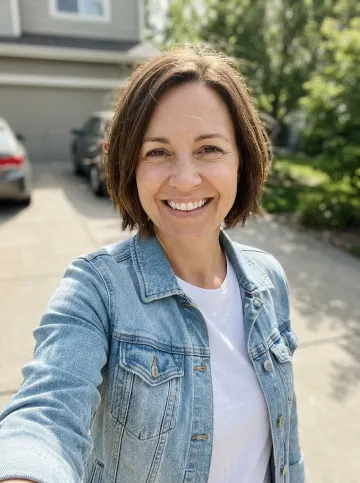
Made from this selfie
Step by step
How to make a Crazy Frog AI video in 5 steps
The whole tutorial takes five minutes, and most of that is the render. Every step happens in the generator at the top of this page.
- 1
Pick one clear photo
Choose a photo where one face is big, sharp and turned to the camera. A selfie in daylight is ideal. The AI copies the face, hair and outfit into the rider, so whatever the photo shows ends up on the invisible motorcycle.
- 2
Upload it to the generator
Tap Your photo or drop the file on it. JPG, PNG and WebP all work. To ride with a friend, add their photo with Add a friend. Sign in with Google when asked; your photos and your video stay private to your account.
- 3
Choose a scene, a face and an ending
Overpass is the original trend look; eleven more scenes, from Neon Tokyo to Underwater, move the ride somewhere else. Face sets the look for the whole ride: Smile, a dead-serious Serious or a mouth-wide-open Scream. Ending picks the classic Flip or a Wipeout, where the rider tumbles, sits up dazed and gives a thumbs up. 720p HD costs 10 credits and is the one to post; 480p costs 5 credits for a quick test.
- 4
Press Generate and wait 3 to 6 minutes
The progress screen walks through the ride, the cop and the flip. After three minutes you can leave: the finished clip waits under My works. If a render fails, its credits return to your balance automatically.
- 5
Download and post
Download the MP4: 15 seconds, 9:16, engine sound included. On TikTok, add the Crazy Frog Axel F track from the sound library and paste the caption the generator writes for you. The same file fits Instagram Reels and YouTube Shorts.
Photos
Photos that work and photos that fail
The photo decides how much the rider looks like the person. The first two below give a clear likeness; the other four give a stranger, and each one fails for its own reason.
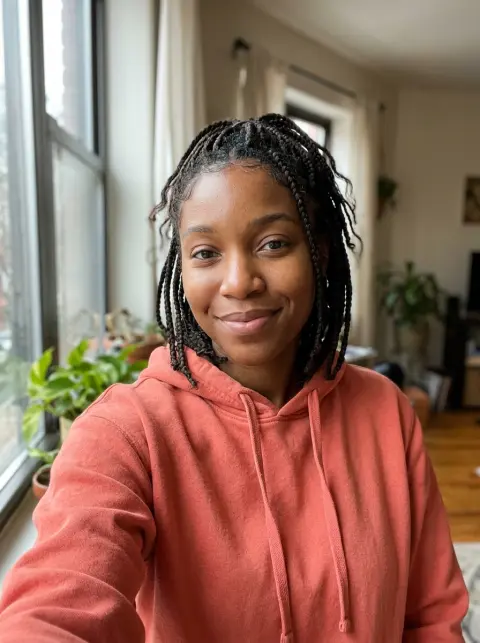
Works: a front-facing selfie in daylight. Both eyes, even light, one face filling the frame. 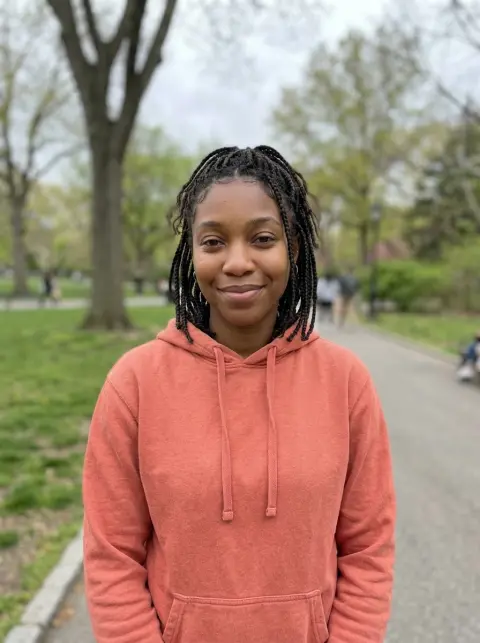
Works: a waist-up photo taken by a friend. The face stays sharp and the whole outfit comes through. 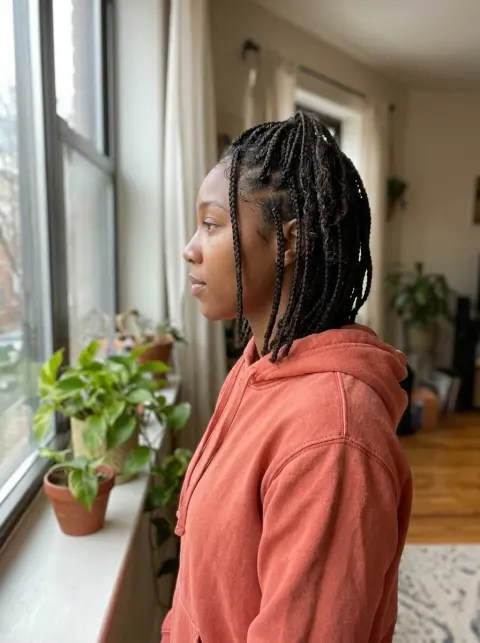
Fails: a side profile. The AI has to invent the half of the face it cannot see. 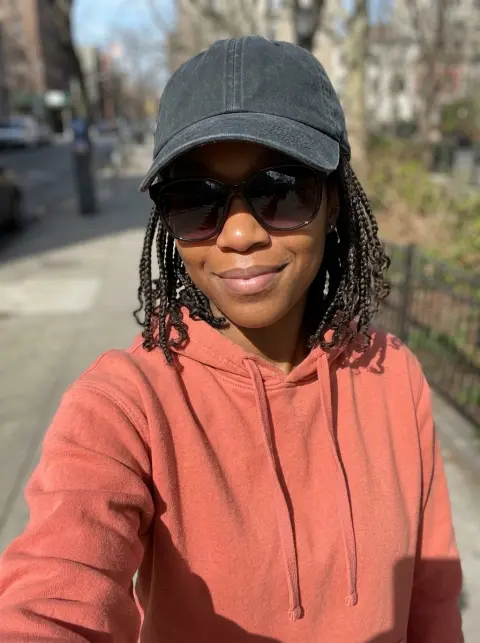
Fails: sunglasses and a cap. The eyes get guessed, so the rider looks like someone else. 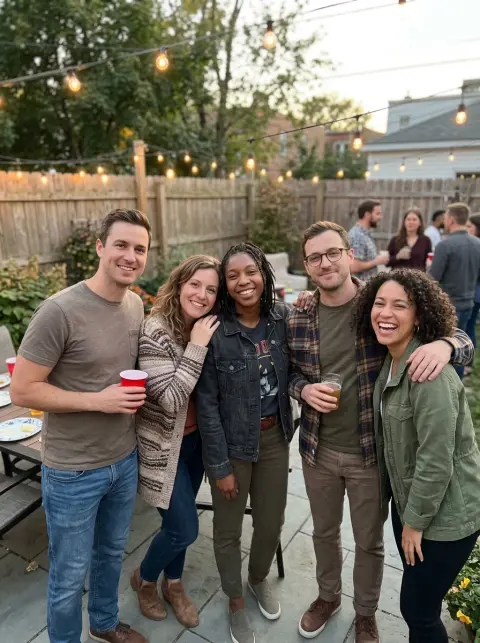
Fails: a group photo. The AI picks one face, and it is not always the right one. 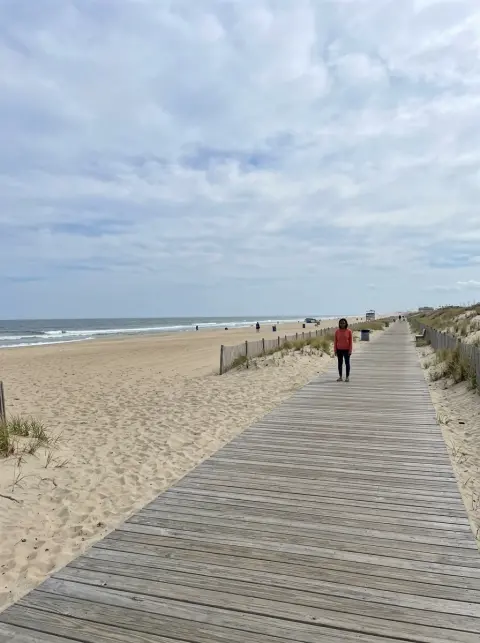
Fails: a far-away shot. A face a few pixels tall has no detail to copy.
Methods
3 ways to make the Crazy Frog AI video
Every Crazy Frog AI video on TikTok comes from one of three routes. They differ in how much you set up and how close the result stays to the trend clip.
Get the prompt for Seedance, Kling and Veo| Feature | Crazy Frog AI | Higgsfield Genjutsu | A prompt in a video tool |
|---|---|---|---|
| What you upload | One photo | The trend clip and your photos | Your photo, plus a reference clip in Seedance or Kling |
| Prompt | None, it is built in | Optional | A long, exact prompt |
| Finding the trend clip | Not needed | You supply it | Needed for Seedance and Kling |
| Stays close to the trend | Yes: a built-in reference ride with the cop and the flip | Yes: it copies the clip’s motion | Depends on the prompt; one-line prompts fail |
| One 15-second video | $6.99 at 720p, $3.50 at 480p | 104 credits at 720p, $5.20 on Higgsfield’s list price | Depends on the tool and plan |
| Best for | A fast result with your own face | Remaking one exact TikTok clip | Full control over every detail |
Troubleshooting
Fix common Crazy Frog AI video problems
Nearly every problem traces back to the photo or the wait. Here is what to change.
The face does not look like the photo
Upload a sharper, front-facing photo with no sunglasses or hat, lit from the front. A second try with a better photo is the fix for likeness problems.
The render failed
The credits for a failed render return to your balance on their own. Failures come from the photo: no clear face, several people, or an image the model refuses. Try another photo.
It is taking longer than 6 minutes
Renders slow down when the trend peaks. Keep the page open or come back later; the video lands under My works the moment it is done.
The rider wears different clothes
The outfit comes from your photo. A close selfie shows little of it, so the AI fills in the rest. Use a waist-up photo to choose the outfit yourself.
There is no song on the video
The video comes with engine sound. Add the Crazy Frog Axel F track from TikTok’s sound library before posting; that also lists your clip on the trend’s sound page.
I need a horizontal video
Every Crazy Frog AI video is 9:16, made for TikTok, Reels and Shorts. For a horizontal post, place it on a 16:9 background in any video editor.
FAQ
Making a Crazy Frog AI video: FAQ
No. The reference ride is built into Crazy Frog AI, so you only upload a photo. The original clip is only needed for motion-transfer tools such as Higgsfield Genjutsu.
Yes, as long as they agreed. Upload their clear, front-facing photo exactly like your own, then send them the clip.
Yes. Upload a second photo with Add a friend and the two of you ride side by side, flip together and get away together, with the hover-bike cop on your tail. It costs the same as a solo ride.
Crazy Frog AI is built and tested for real people. Pets and drawn characters are not supported.
Yes, if the face is sharp and large in the frame. Crop out other people first and skip heavy filters, which change the face the AI copies.
Every render is new: the camera, light and small details change from take to take, while the squat, the cop and the flip stay. The scene you pick moves the location too. Generate again for a different take, or read what the Crazy Frog AI trend clip looks like.
Your photo, on the invisible motorcycle
One photo, 3 to 6 minutes, ready to post.